Why SPF, DKIM, and DMARC Matter for Your Domain
Michael Cyger
When you send email from your domain, inbox providers and corporate filters check a few things before they decide whether to deliver your message or send it to spam.
The main signals they use are three DNS records: SPF, DKIM, and DMARC. If those records are missing or wrong, your deliverability suffers and your messages may never reach the inbox.
Understanding what these records do and how to check them helps you fix problems and improve the chance your email gets through.
What Are SPF, DKIM, and DMARC?
SPF (Sender Policy Framework) is a DNS record that lists which servers are allowed to send email for your domain. When a receiving server gets a message from you, it looks up your domain’s SPF record. If the sending server isn’t in that list, the receiver can treat the message as suspicious or reject it.
DKIM (DomainKeys Identified Mail) adds a cryptographic signature to your outgoing email. The signature is tied to your domain and a private key that only your sending server holds. The receiving server looks up a public key in your DNS and verifies the signature. If it matches, the message hasn’t been tampered with and really came from your domain. Many providers, including Amazon SES and Google Workspace, use custom DKIM selectors, so you may need to check more than one record.
DMARC (Domain-based Message Authentication, Reporting and Conformance) is a DNS record that tells receivers what to do when SPF or DKIM checks fail. It also lets you request reports so you can see who is sending as your domain and whether those messages pass or fail. A typical policy is to quarantine or reject messages that fail authentication, which protects your domain from spoofing.
Together, SPF, DKIM, and DMARC tell the world which servers can send for you, prove that your messages are authentic, and define how receivers should handle messages that don’t pass.
Why Check Your Records?
You might have set up email years ago and never looked at these records. Or you might have changed providers and left old records in place. Either way, the DNS for your domain can end up with missing, outdated, or conflicting records.
When that happens, legitimate mail can fail SPF or DKIM. Receivers may then apply your DMARC policy and quarantine or reject the message. The result is bounces, spam placement, or silent drops.
Checking your records is a quick way to see if the basics are in place. You can spot a missing record, a typo in an SPF include, or a DMARC policy that’s too strict or too loose. Fixing those issues often improves deliverability and reduces support headaches.
What a Checker Shows You
A good checker looks up your domain’s DNS and shows you the current SPF, DMARC, and DKIM records. For each one it can show whether a record was found, what it says, and whether it looks valid. For DKIM, some tools let you add custom selectors so you can check the records that providers like Amazon SES use.
You’ll typically see a status for each record: OK, Weak, or Missing. OK means the record is present and looks correct. Weak might mean the record exists but has a configuration that’s often considered soft (for example, SPF ending in ~all instead of -all). Missing means no record was found, so you need to add one or fix the host name you’re checking.
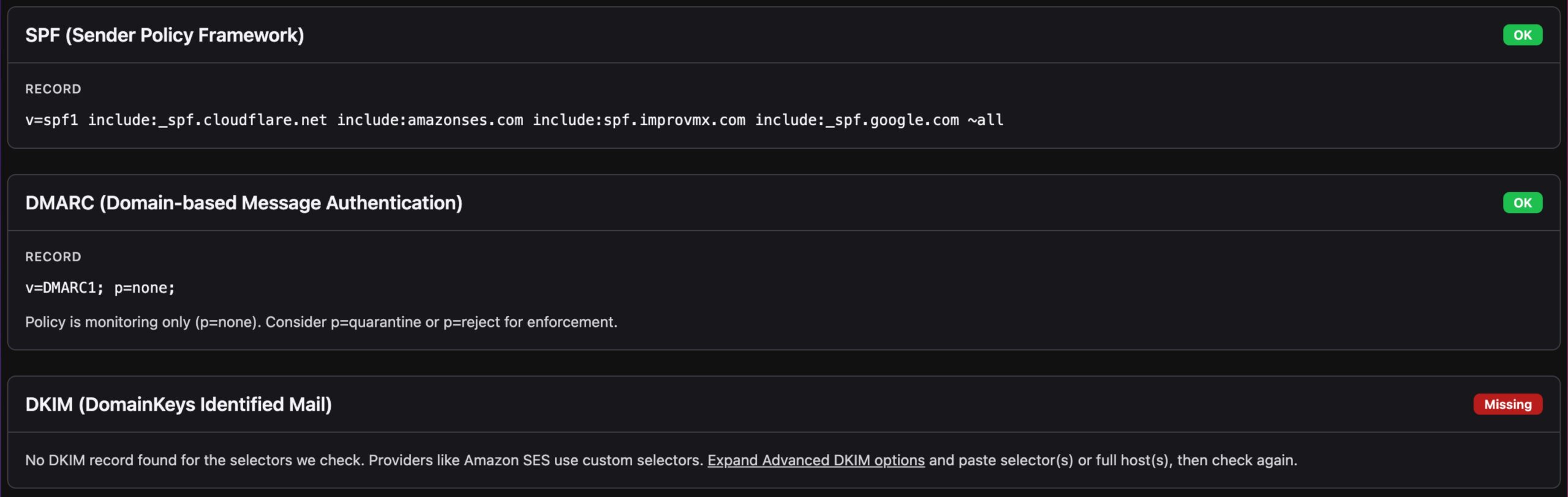
If SPF is missing, add a record that authorizes your mail server or provider. If it’s weak, consider tightening the policy (for example, -all instead of ~all) once you’re sure all legitimate senders are included.
If DKIM is missing, add the record your provider gives you. If you use a provider with custom selectors (like Amazon SES), use the advanced options in the tool to enter the selector or full host name and check again.
If DMARC is missing, add a policy. Start with a monitoring-only policy (p=none) if you want to collect reports first, then move to p=quarantine or p=reject when you’re confident your legitimate mail is authenticating.
Understanding SPF, DKIM, and DMARC helps you keep your domain’s email in good shape. Check your records, fix what’s wrong, and your deliverability can improve.
Be First to the Domain You Want
Get instant notifications the moment a domain name opportunity appears, with clear, step-by-step guidance to help you confidently secure it.
7-day free trial. No credit card required.