Registration, Renewal, and Transfer Pricing on Every Dashboard

Founder, Notify.domains · ex-GoDaddy Director of Education · founder, DomainSherpa & DNAcademy
Last updated
I almost placed a backorder on a domain I thought was cool. The name looked interesting on paper. I had it on my watch list in Notify.domains while I waited to see if it would expire. Then I opened the Status tab and saw the renewal price.
That is the moment this feature is built for.
What shipped
Every logged-in Notify.domains account now sees three pricing cards on the Status & Registration tab for each monitored domain: registration price, renewal price, and transfer price. The numbers are typical retail pricing in USD for a one-year term. When a name is flagged as registry premium, you will see a Registry Premium badge on the registration row.
No extra setup. If you already monitor a domain, open your dashboard, pick the domain, and stay on Status. The cards sit with your registration and lifecycle details.
The domain that stopped me
The name was back.space. Clever TLD, memorable string, the kind of name you notice when you are scanning expiring inventory or thinking about a backorder at SnapNames.
On the dashboard it looked like this:
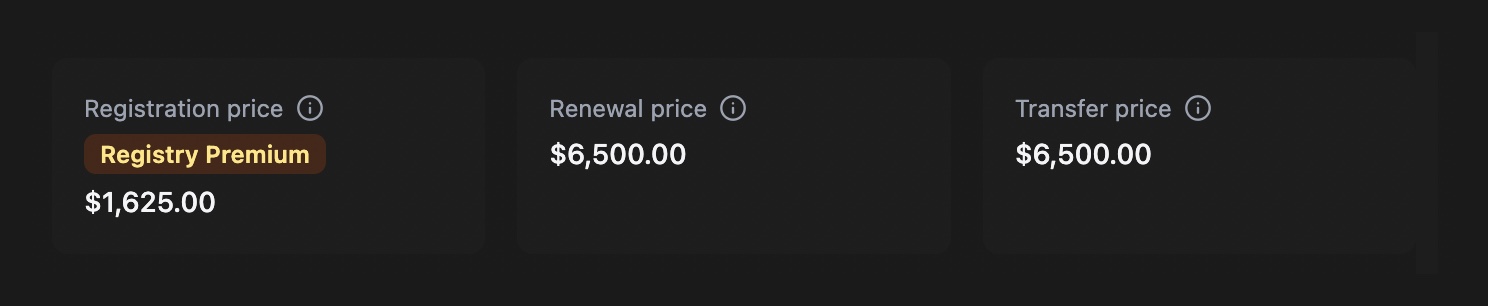
Registration showed $1,625.00. Renewal and transfer both showed $6,500.00. Registry premium.
I would not have caught that from the domain string alone. A $1,625 first-year number can feel plausible for a short, brandable name on a newer TLD. The renewal column is where the real liability lives. If that name had dropped and my backorder had won, I would have been on the hook for a $6,500 renewal to keep it, every year, unless I let it go.
That is not a mistake I wanted to make on a name I liked mostly because it looked cool.
Why this matters before you backorder or catch a drop
Backorders and drop catching are about timing and placement. They are also about economics. Winning the auction or catching the name is only step one. Keeping it means paying the renewal the registry sets for that specific label, not the promo price you remember from a registrar homepage.
Premium pricing is per-name. It does not behave like standard .com renewals. The registration price and the renewal price can be far apart. Transfer pricing often tracks renewal. If you are comparing SnapNames, DropCatch, GoDaddy Auctions, or any other path into a name, you want those three numbers in view while you still have time to decide.
We wrote a longer guide on the mechanics if you want the background: how domain renewal pricing works. You can also spot-check any single name in the Domain Renewal Cost Checker. The dashboard cards use the same pricing pipeline, stored quietly on your domain record and refreshed when you add a name or when you load Status.
How to read the cards
Hover or tap the (i) icon on any row for a short note: typical retail pricing, actual prices vary by registrar. On premium names, the tooltip calls out that renewal is set by the registry for that label. We link to TLDes for TLD context when you want to dig into extension-level pricing tiers.
These are reference prices, not a quote from your registrar cart. They are still useful. They tell you whether a name is in standard TLD territory or premium territory before you commit attention, budget, or a backorder fee.
Who this helps
Founders with a shortlist. Investors watching expiring inventory. Anyone who has ever thought, “I will figure out the renewal later.” Later is expensive on the wrong name.
If you monitor drops and auctions, pair this with the rest of your Status view and your alerts. Pricing does not replace WHOIS, auction, or marketplace signals. It answers a different question: if I win this name, what does it cost to keep it?
Open a domain you are unsure about and look at the renewal row first. If you are weighing a backorder, read how domain backorders work and compare the renewal number to what you are willing to carry.
Questions in-app? Use the chat on your dashboard. We are happy to talk through a specific name.
Start monitoring a domain with registration, renewal, and transfer pricing on the Status tab. Try Notify.domains. Seven-day free trial. No credit card required.
Be First to the Domain You Want
Get instant notifications the moment a domain name opportunity appears, with clear, step-by-step guidance to help you confidently secure it.
7-day free trial. No credit card required.