Social Media Handle Checker for Every Domain You Watch

Founder, Notify.domains · ex-GoDaddy Director of Education · founder, DomainSherpa & DNAcademy
You found the domain you want. Maybe you even acquired it.
The next thing most people think about is whether the same name is free on X, Instagram, and other social media platforms.
Ideally, it would be the exact match of your domain name. But at least it should be consistent across social media platforms.
That’s a search on every site, one at a time, and sometimes it’s difficult to determine if the username is reserved by the platform, available to usee, or taken by someone else.
Every domain you watch on Notify.domains now has a Social Media tab.
It takes the domain name, checks the exact handle on the major platforms, and shows which ones are taken, which look open, and how to sign up on each one.
If the exact name is reserved, you can change the username, and the tab checks that one instead across all the platforms.
The nine platforms
Notify.domains covers these nine platforms, with each site’s username rules:
- X. 4 to 15 letters, numbers, or underscores.
- Facebook. A Page username, at least 5 characters. Letters, numbers, and periods only, so no underscores.
- YouTube. A channel handle, 3 to 30 characters.
- Instagram. 1 to 30 characters.
- TikTok. 2 to 24 characters.
- Telegram. 5 to 32 characters, starting with a letter.
- LinkedIn. LinkedIn doesn’t show publicly whether a company page name is free. The tab links to the page so you can check it yourself.
- Snapchat. 3 to 15 characters, starting with a letter.
- Pinterest. 3 to 30 characters.
This can be a mess to manage. That’s why we built this functionality for you.
example.com becomes @example
For this post, the domain is example.com. The tab drops the extension and uses @example as the username. Hyphens and dots drop out too, so a name like my-shop.com becomes @myshop.
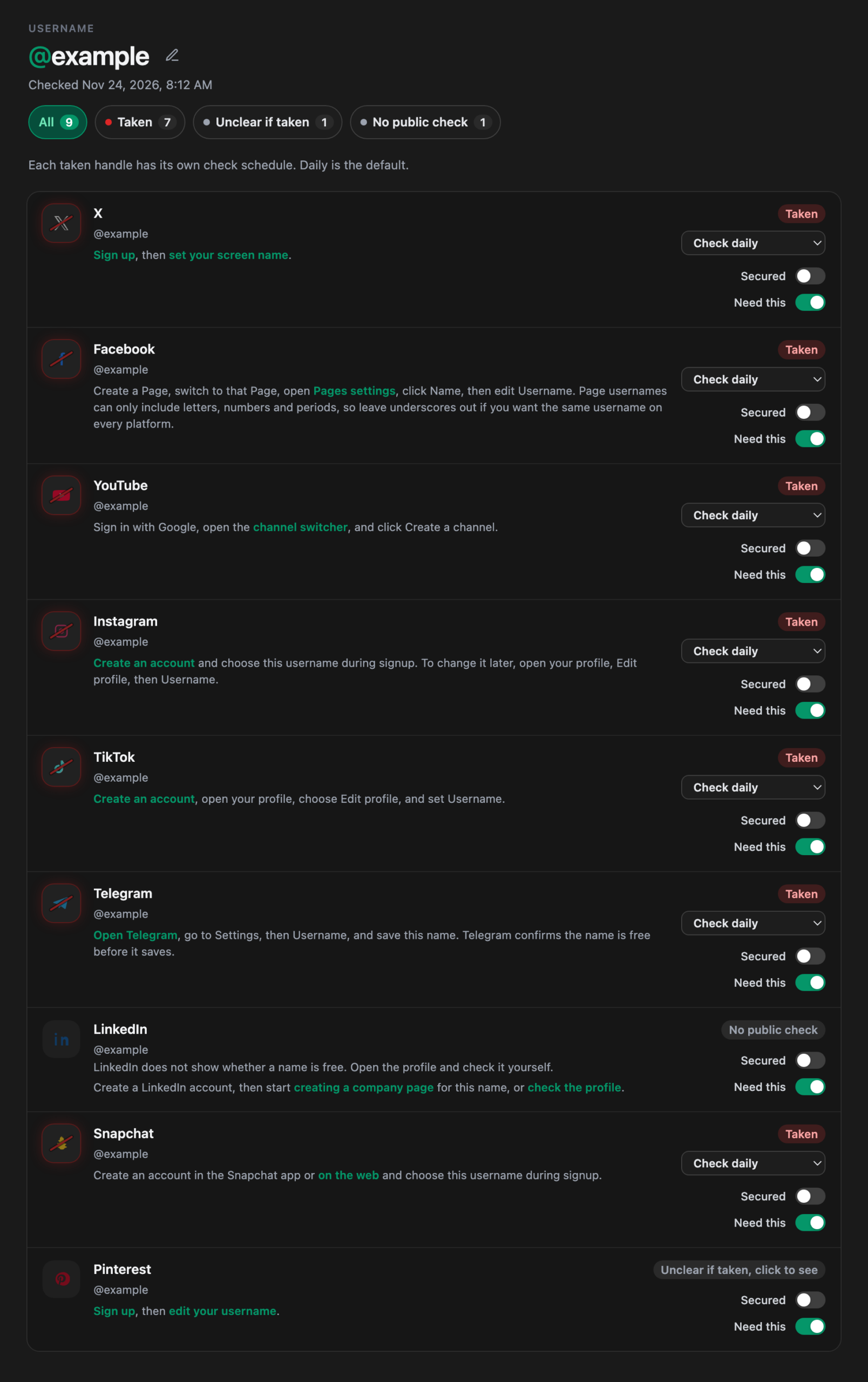
Each row shows the site, the handle, and a status:
- Taken. Someone already has the name on that site.
- Available. Nobody appears to have it. Sign up and claim it.
- Unclear if taken. The site didn’t give a clear answer. Click the status to open the profile and look for yourself.
- No public check. LinkedIn. Open the link and check it yourself.
- Doesn’t fit. The name breaks that site’s rules. It might be too long, too short, or have an underscore on Facebook.
The site name and the handle are links. Click either one to open that profile in a new tab and see who has it.
How to register each handle
We help you choose a handle you can use consistently across the platforms that matter to your brand. We review availability, flag naming restrictions, and suggest close alternatives when your first choice isn’t available everywhere.
Once you’ve settled on a name, you’ll find a short note under each handle explaining what’s needed to claim it. The steps vary by platform: you may need to create an account, set up a company page, or update an existing profile. We point you to the right place so you can register each handle yourself.
If your preferred handle is available, we recommend claiming it promptly. Availability can change before you complete registration.
Mark the ones you have, skip the ones you don’t need
Once a handle is yours, turn on Secured on that row. The status changes to Secured, and we stop checking it. You can see at a glance which sites are done and which are left.
Some sites won’t matter to you. Turn off Need this on those rows. They drop out of the character limit. If you’ll never use Snapchat, turn it off, and X is the only site holding you to 15 characters.
When @example is taken, try @examplehq
A short, common word like example is taken on almost every site. That’s normal. You can still keep one username everywhere with a close variation.
Click the pencil next to @example. Type a new username and click Check.
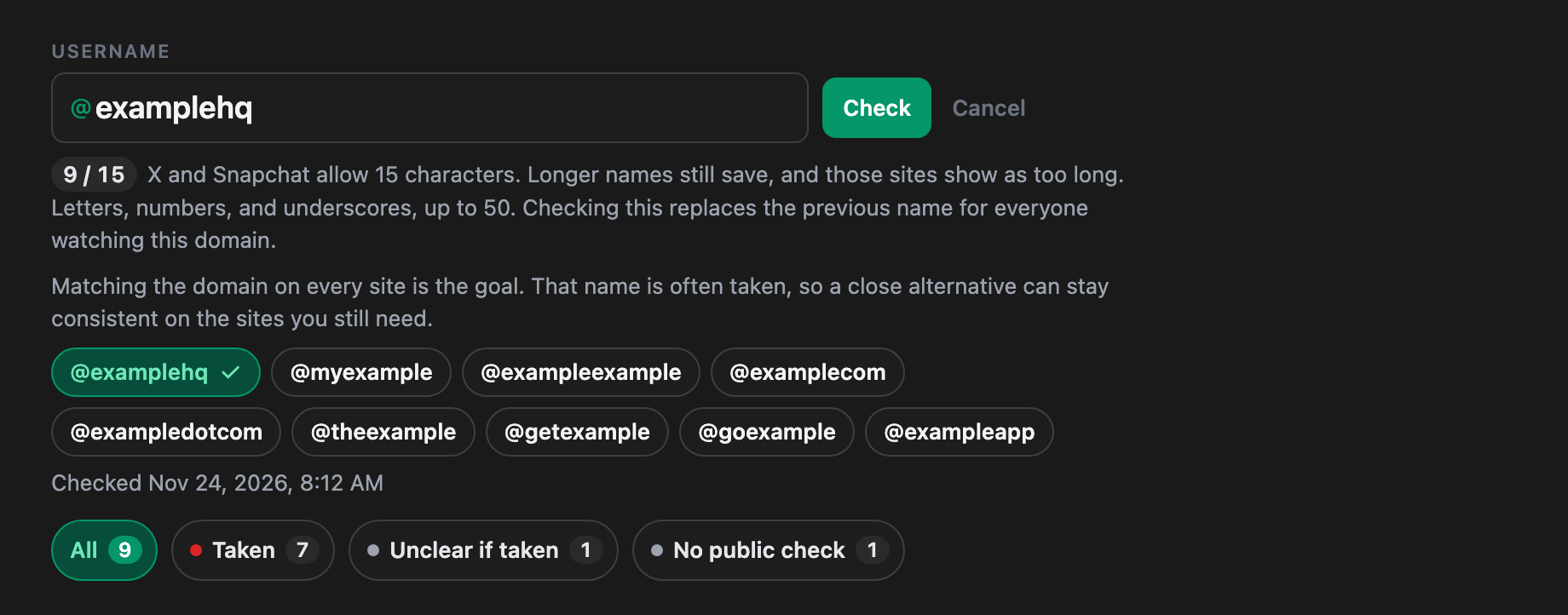
The counter under the box shows how many characters you’ve used against the tightest limit. When the name is taken on at least one site, the tab suggests variations, like @examplehq, @myexample, @getexample, and @exampleapp. Click one to fill the box.
The username belongs to the domain, so checking a new one replaces the old one for everyone watching that domain. To go back, open the editor and click Use the domain name.
Here’s the same example after checking @examplehq:
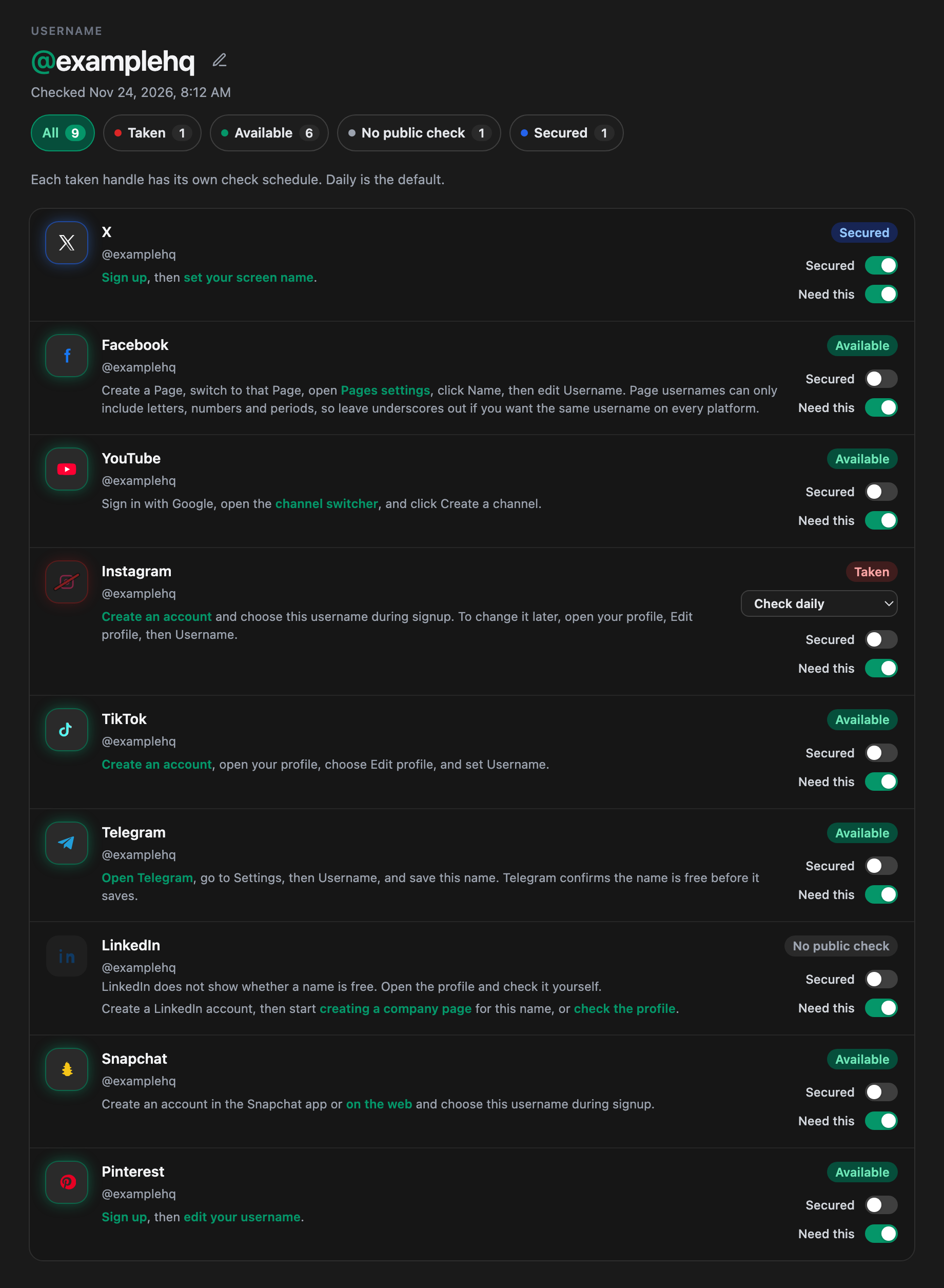
Six open and one taken is a much better spot than seven taken. Register the open ones, mark them Secured, and decide whether Instagram is worth chasing.
A taken handle can open up later
Taken isn’t always taken for good. Accounts get deleted, and people change their usernames. Each taken handle keeps getting checked on a regular basis.
Asking the owner of a taken handle
Sometimes the account on the name you want is empty, years old, or clearly abandoned. Click the handle to open the profile. Most sites let you message the account from there.
Most platforms don’t allow buying or selling usernames, so ask whether the owner would release the name or transfer it, instead of offering to buy the account.
It’s the same kind of note you’d write about a taken domain, with a smaller ask. How to get a domain that’s taken covers how to write that first message. If you don’t hear back, set a follow-up on the domain and log it as a Social DM, so you remember to try again.
The name is more than the domain
When you check a domain and its social handles together, you’re really checking a brand name. Someone else holding the name on X or TikTok can matter as much as a lookalike domain. Brand domain monitoring covers the domain side of that, and brand protection monitoring covers the watch around it.
The Social Media tab is on every domain you watch, trial included. A name you add gets checked right away. Names already on your watchlist are in line for a check, and the tab says Queued until theirs runs.
A seven-day trial is free and doesn’t ask for a card. Add the domain you want and open Social Media. If a status looks wrong, send us the domain and the site in the in-app chat.
Be First to the Domain You Want
Get instant notifications the moment a domain name opportunity appears, with clear, step-by-step guidance to help you confidently secure it.
7-day free trial. No credit card required.