Follow Up on a Domain You Are Trying to Buy

Founder, Notify.domains · ex-GoDaddy Director of Education · founder, DomainSherpa & DNAcademy
You emailed the owner. You wrote the offer down somewhere. A few weeks later you cannot remember if they answered, or what you said you would do next.
Follow-up is the reminder you set on that name. It keeps the note, the offer, and the morning you want to try again. The reminder comes to you. It does not email, text, or call the owner.
The name in the pictures, larkandpine.com, is made up. So is the phone number. Yours will show the real name.
Where to open it
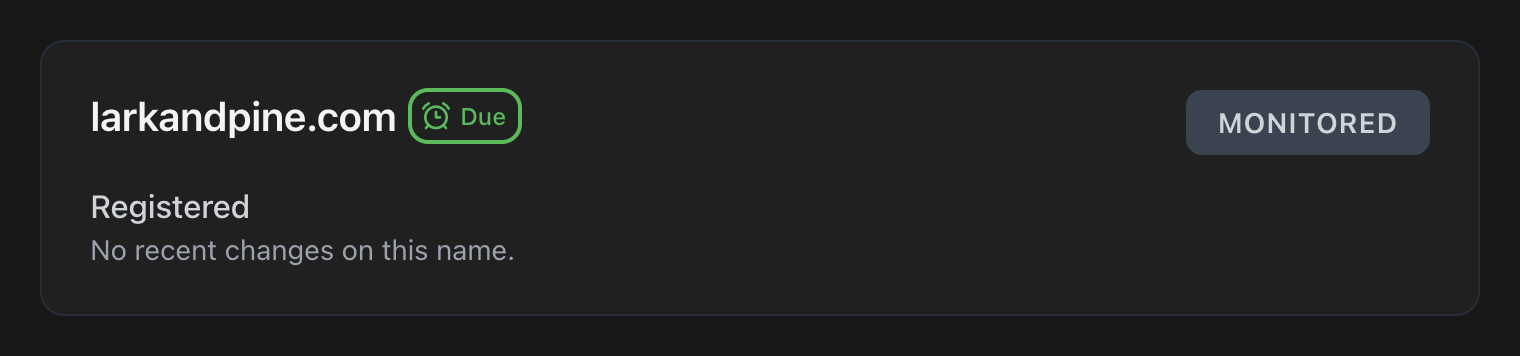
On the dashboard, a small alarm clock sits beside the domain when a follow-up is waiting. When it is time, the clock turns green and says Due. Click that clock. The domain opens, and so does Follow-up.
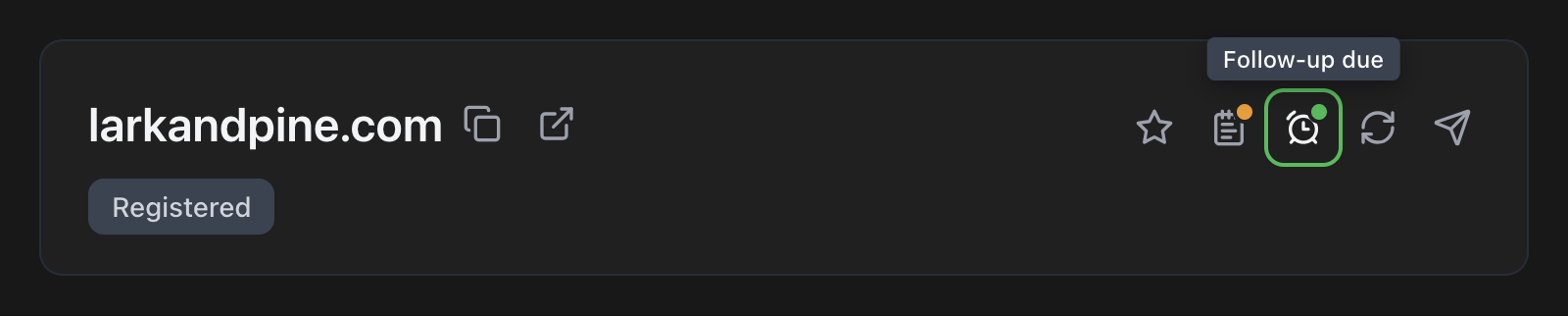
You can also open the domain the usual way. In the header, to the right of the star and the note, is the same alarm clock. A green dot means one is due. Hover it and the label says Follow-up due. Click it.
The first screen
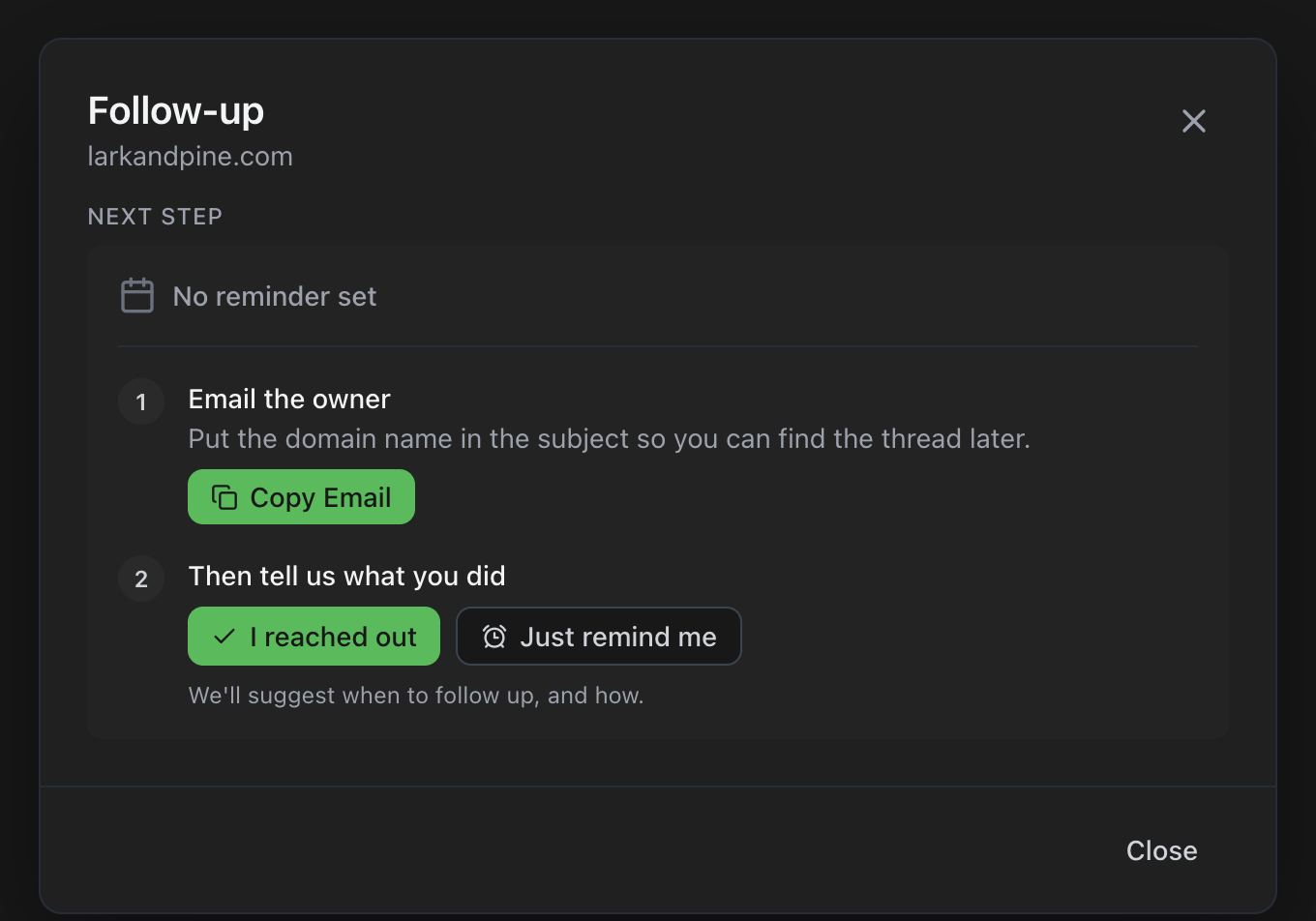
If you have not logged anything yet, the card says No reminder set.
Step 1 is how to reach the owner. When an email is on the name, it says Email the owner. Copy Email puts that address on your clipboard. Put the domain name in the subject so you can find the thread later. If the address goes through a privacy service, the screen says that too.
Step 2 is Then tell us what you did. I reached out is for after you have actually written, called, or texted. Just remind me is for when you have not reached out yet and you only want a date on the calendar. That button is there when nothing is scheduled.
Log what you already did
Say you emailed yesterday and you are catching the log up this morning. Click I reached out. The title changes to What did you do?
Pick how you reached them. Email, Call, Text, Social DM, Web form, or Other. Email is the one in this picture. Subject, the day, your offer, a note, and when you want the nudge.
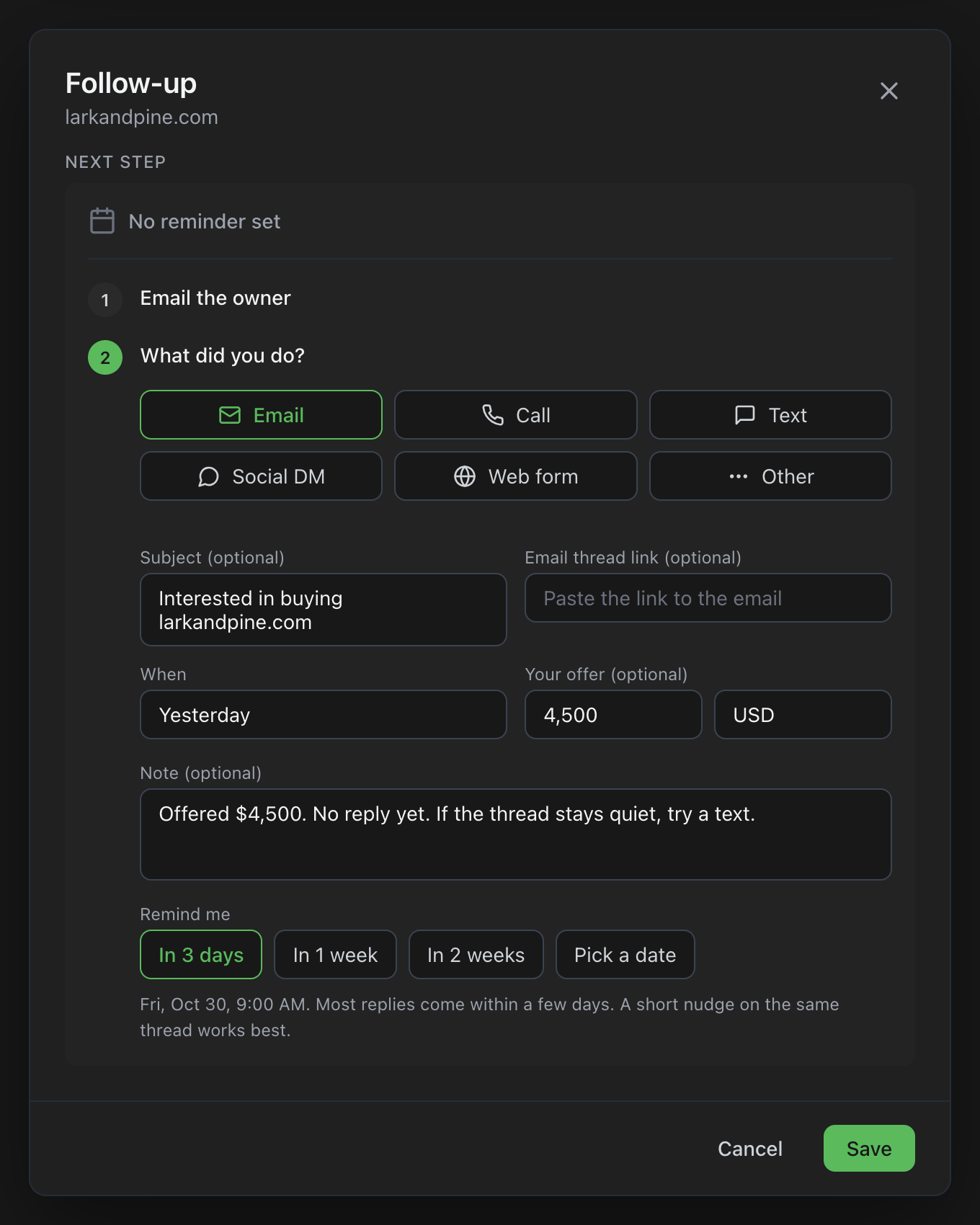
Save. The next morning you asked for is now on that domain.
The fields that are worth filling
You can leave most of them blank. A few of them are why the next reminder is useful instead of a bare alarm.
- Subject. The next reminder can tell you to reply on that thread, and Copy Subject is one click when you do.
- Email thread link. Optional. Paste the link to the message in your mail. Later, Open Email Thread jumps straight to it.
- Phone. Shows up when you pick Call or Text. The next time, Copy Number is there.
- Where, and a profile link. For a social message: LinkedIn, X, Instagram, Facebook, or another network.
- Form link. When you used their contact form.
- How you reached them. For Other. A letter, a friend, the message box on an auction.
- When. Today, Yesterday, or Pick a date. Use yesterday if you are logging it the next morning. The activity list stays honest.
- Your offer, and later their ask. Whole dollars are fine. USD, EUR, or GBP. They stay on the page so you are not reconstructing the negotiation from memory.
- Note. What you said, or what they said. This is the line that comes back in the reminder.
- Remind me. The chips change with what you just logged. A new email suggests 3 days, because most replies show up in that window. A text is the same idea. A call with no answer suggests tomorrow. Too expensive jumps to months. The line under the chips is the morning you will be reminded, at 9:00 AM, unless you pick your own time.
Call has one extra choice before those fields. Talked, Left voicemail, or No answer. Talked means you actually reached them, so the screen switches to what they said.
If a reminder is already sitting on a future morning and you are only logging what you did, you will also see Keep and that date. Pick it when you do not want to move the reminder.
What the email looks like
On the morning you picked, the email subject is Time to contact the owner of the name.
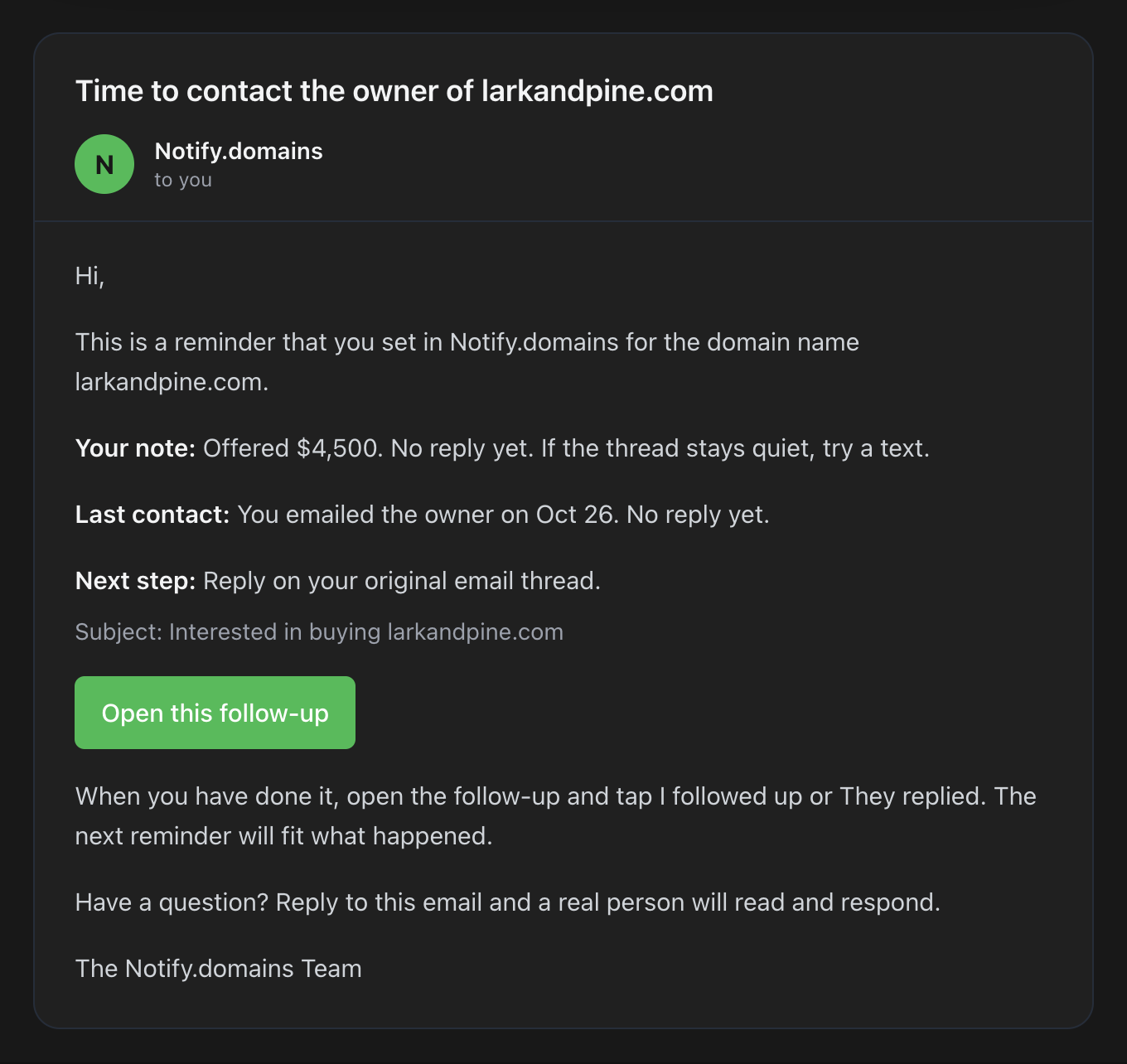
Your note is in the message. So is the last thing you logged, and the next step. In this example the next step is to reply on the original thread, with the subject under it. Open this follow-up brings you back to that domain with Follow-up open.
The same reminder lands in the bell at the top of the dashboard, above the usual change alerts. The checkmark clears it without opening the domain. View All goes to your alerts page, where this row sits with the others.
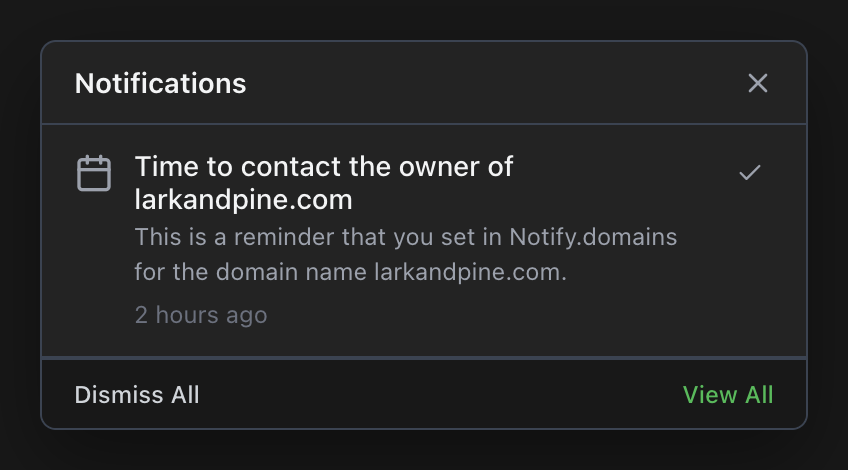
If Slack, Telegram, or a webhook is already on for that domain, the same reminder goes there too. You do not turn on a separate channel for follow-ups.
Snooze it, or read what you already did
Open it from the email, the bell, or the green Due clock. The card is green. Due now, and the time.
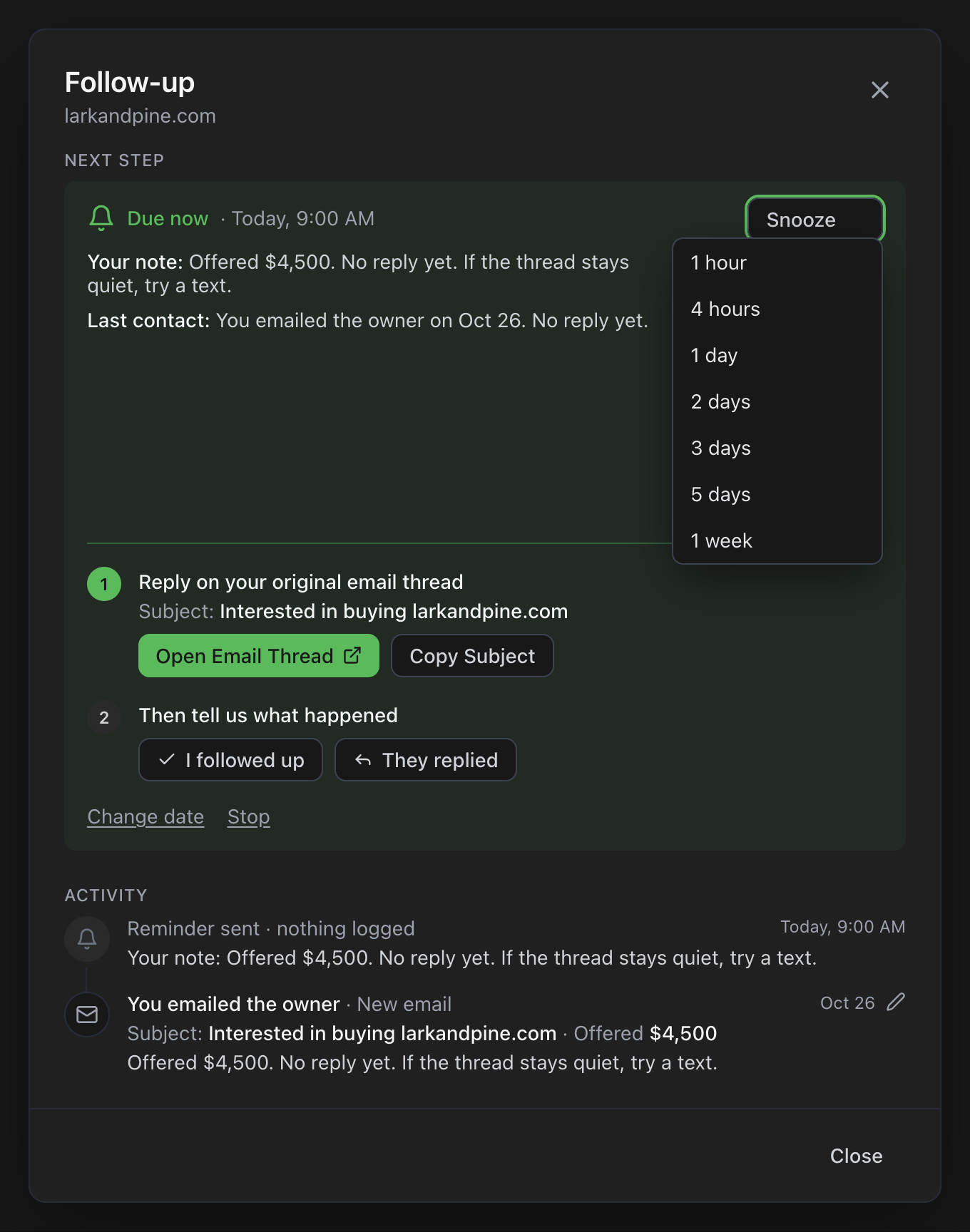
Snooze is on the right once the reminder has fired. One hour, four hours, one day, two days, three days, five days, or one week. Snooze does not mean you reached out. It hides the reminder until that time, then it comes back. If the reminder has not fired yet, you will not see Snooze. Change date is how you move a future one.
Activity, under the card, is the story so far. Newest first. A reminder that fired and was never logged says Reminder sent, nothing logged, plus the note you saved. Your email is the next row: the subject, the offer, and what you wrote. The pencil edits that entry. Editing an old entry does not move the reminder.
Three rows show, then Show more. Step 1 on a due reminder is the suggested move. Here it is reply on the original thread, with Open Email Thread and Copy Subject. After two unanswered tries on the same route, that step changes to Try a different way to reach them. A contact form switches after one.
You did something else
The suggestion may say to reply on the email. You texted instead. Click I followed up, then Text.
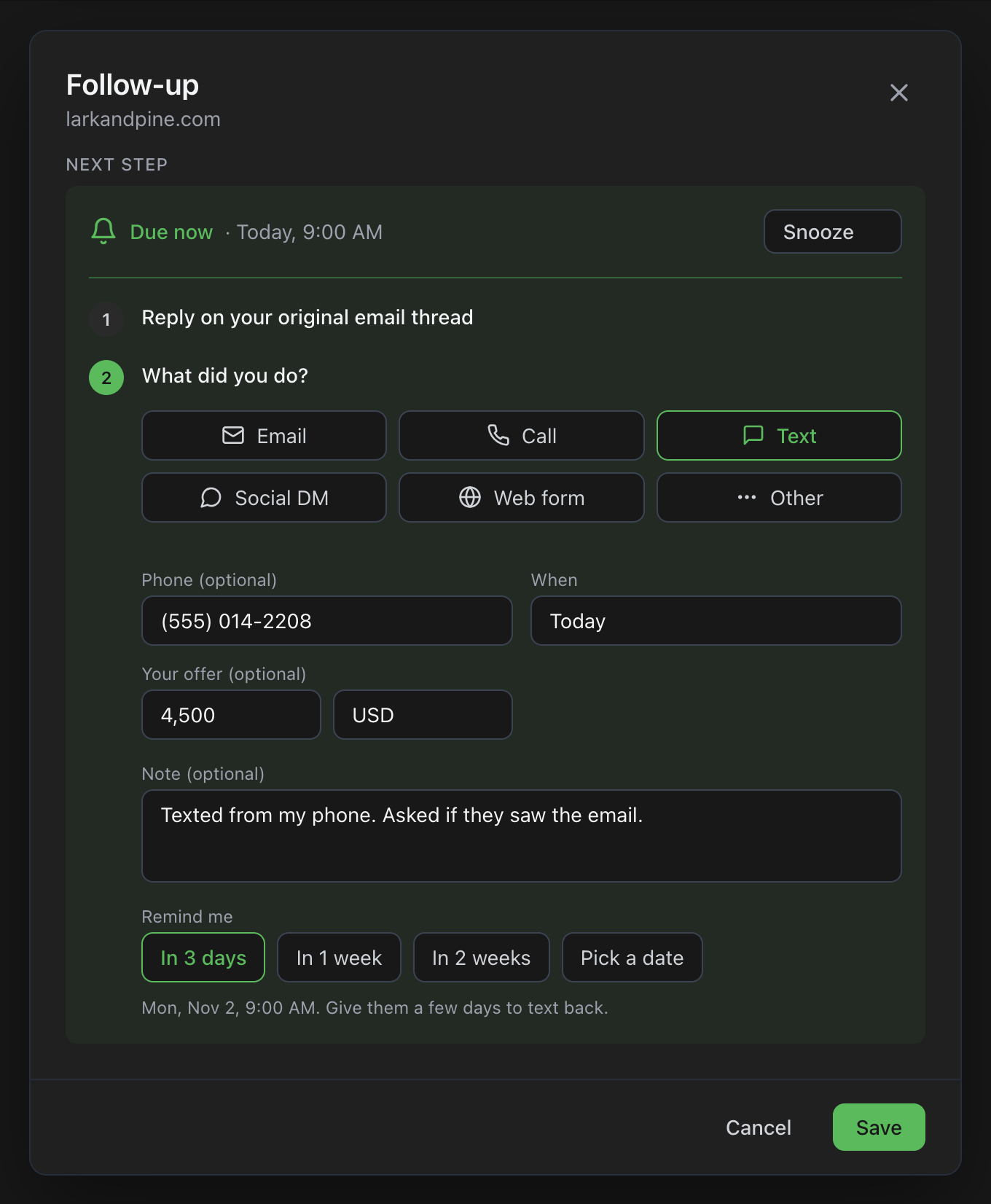
Phone, the day, the offer if it changed, and a note about what you actually sent. Remind me suggests three days for a text. Give them a few days to text back. Save, and Due comes off the domain until that next morning.
The same screen covers a call, a social message, a form, or some other route. Pick the one you used. The log is there so the next reminder knows which try you are on.
They answered. Set the next time.
Click They replied. The question changes to What did they say?
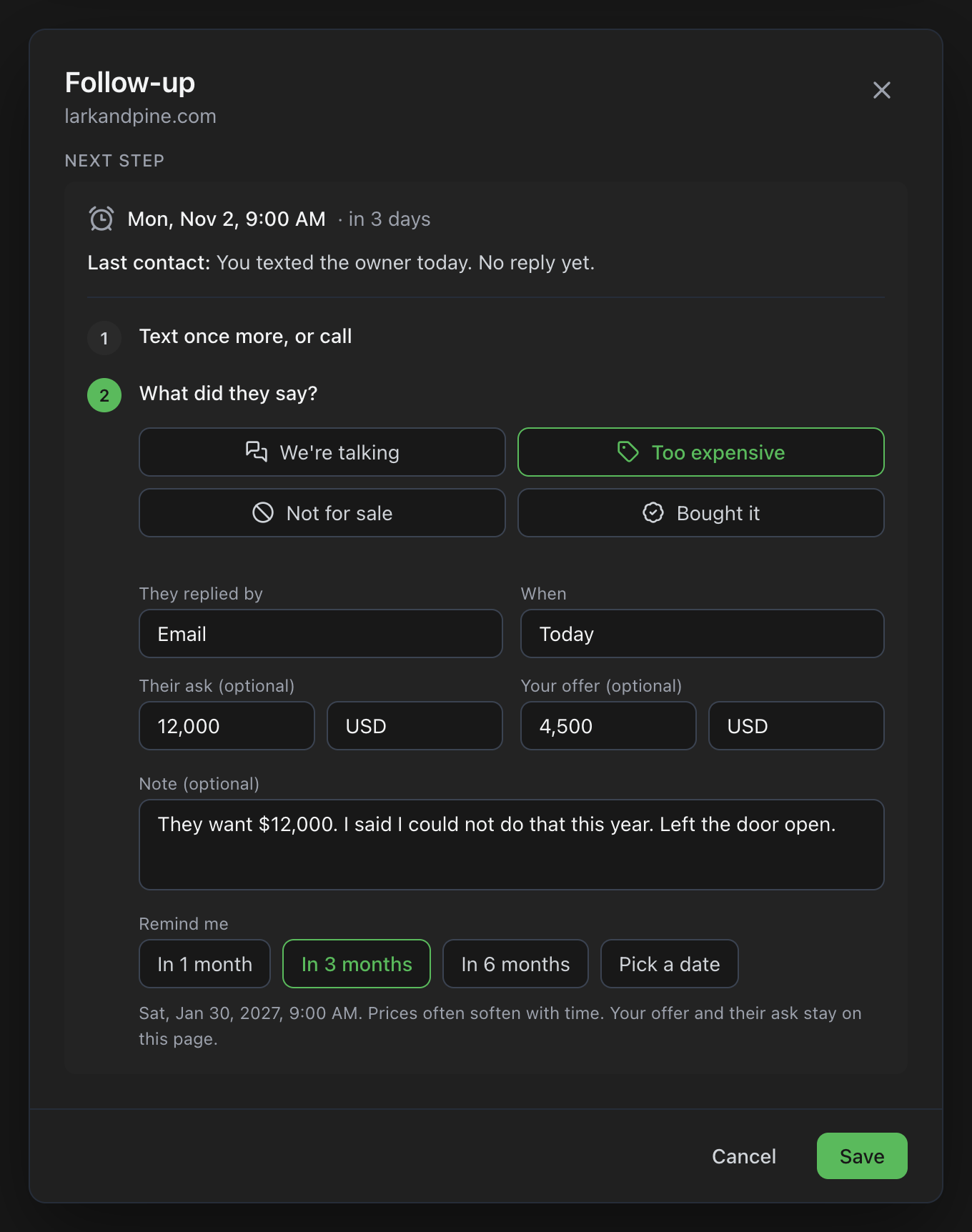
- We’re talking. The next nudge stays close, so the conversation does not go cold. Their ask and your offer both have a place.
- Too expensive. The chips jump from days to months. One month, three months, or six. Prices often soften with time, and both numbers stay on the page for the next check.
- Not for sale. Six months, a year, or No more reminders. One friendly check-in later is enough.
- Bought it. Saving turns every follow-up off for that name.
They replied by is the route. Email, a phone call, a text, LinkedIn, X, Instagram, Facebook, a contact form, or something else. When is the day they answered, which might be today or yesterday.
Move the next contact without a new note
Change date is on the card when a reminder is already set. Just remind me opens the same screen when nothing is scheduled yet. Use it when the plan changed and you did not just reach out.
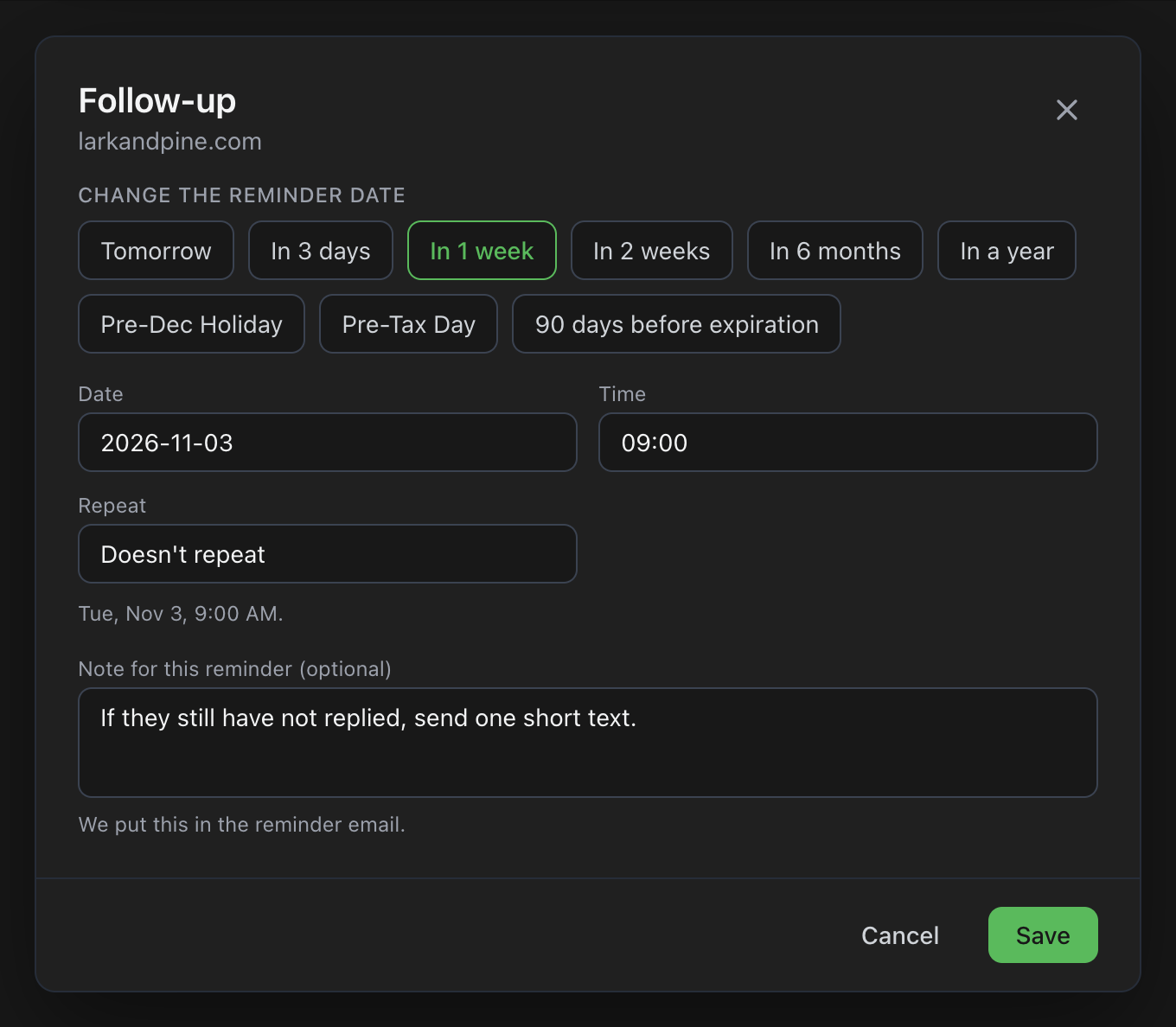
Tomorrow, three days, a week, two weeks, six months, a year. Pre-Dec Holiday and Pre-Tax Day fill a date and set the reminder to come back every year. 90 days before expiration shows up when that date is on the name. Or type your own date and time.
Repeat can stay on Doesn’t repeat, or go to every 3 months, every 6 months, every year, or every N months. The note on this screen is the one that lands in the reminder email. Save.
When to stop
Stop is under the steps. The reasons are simple. It is for sale. It is in an auction. You bought it. Or another reason, which asks for a short note. Follow-ups stay off until you turn them back on. What you already logged stays in Activity.
Stopping a follow-up does not stop domain name monitoring on that name. A listing, a price change, or an expiration still alerts you the way it always has. Domain auction alerts are that other stream. A follow-up is the one you asked for, on the morning you picked.
Who this is for
Anyone working one name for months. Founders sitting on a brand they cannot buy yet. Investors who have an offer out and do not want it to die in a sent folder. The slow path is the one in getting a domain that is already taken: you write, you wait, you try another way. Follow-up is the page that remembers which try you are on.
Open a name you already watch and click the alarm clock. Questions about a specific domain, use the chat. A real person reads it.
Be First to the Domain You Want
Get instant notifications the moment a domain name opportunity appears, with clear, step-by-step guidance to help you confidently secure it.
7-day free trial. No credit card required.